Mobile UA Budget Tracker. Run Monday’s review from one file.
Budget plan, weekly performance, a live channel scorecard and an experiment log — in one Google Sheet for teams running paid UA across several channels.
- ✓ 14-day money-back guarantee
- ✓ Set up in about 15 minutes
- ✓ Sits next to your MMP
Your UA data lives in four places. Your decisions live in none.
CPI and retention sit in one sheet, rebuilt every quarter.
A/B results sit in another — or in a Slack thread nobody can find.
Why budget moved from Meta to TikTok three weeks ago? Nobody wrote it down.
What’s inside
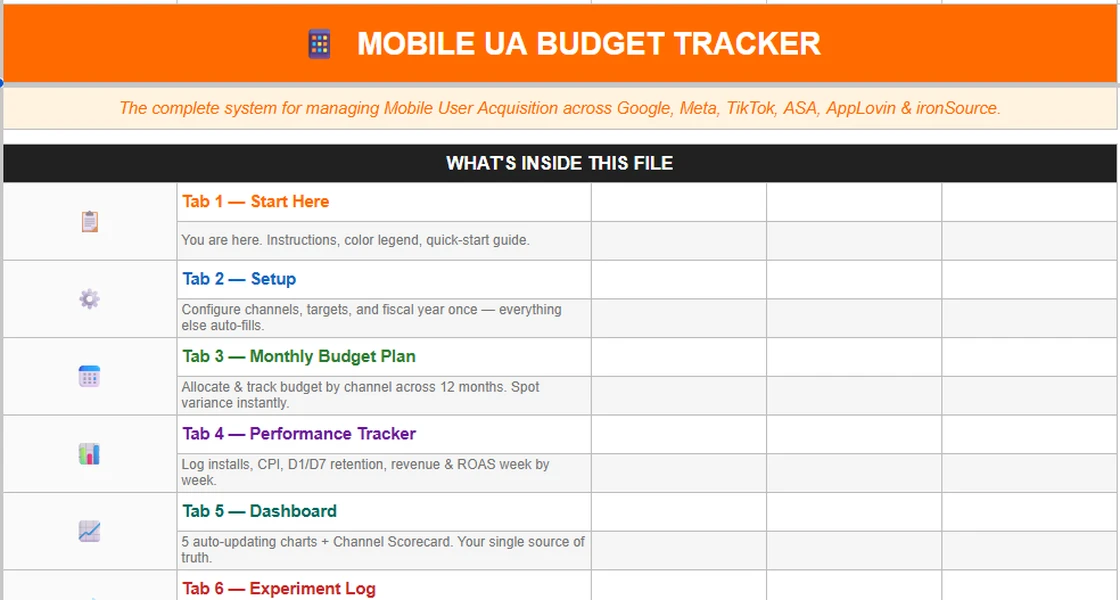
Inside the UA budget template: six Google Sheets tabs
Yellow cells are yours to fill. Gray cells calculate themselves. Green and red flag what’s on or off target. Start with the 24-second overview, then pick a tab to look closer.
The real file, start to finish, in 24 seconds.
A straight scroll through the Google Sheet with sample data: setup, monthly plan, weekly log, dashboard and experiment log. No edits, no mock-ups.
- Watch how the tabs connect
- Then pick any tab above for a sharp, readable screenshot
A 5-step quick start, before you touch a number.
What each tab does, what each cell color means, and the order to fill things in. Setup to first review takes about 15 minutes.
- Map of all six tabs
- Color legend: input, auto, on/off target
- 5-step quick start guide
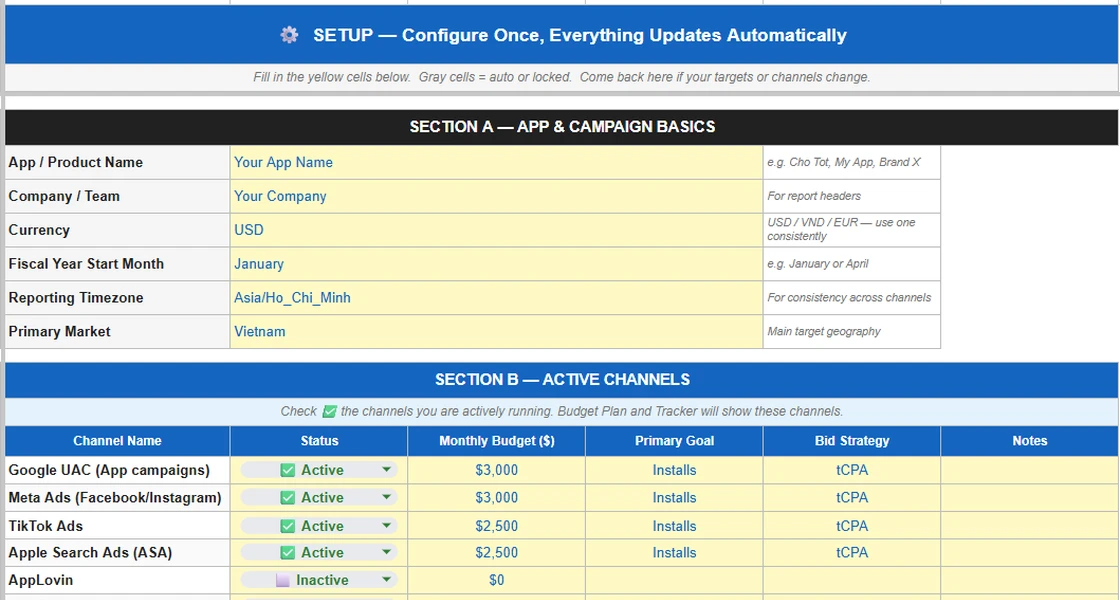
Set channels and targets once. Every other tab reads from here.
Turn channels on or off, set monthly budgets, and define the KPI targets that drive every green and red flag later.
- CPI, D1, D7, ROAS, CAC and LTV/CAC targets with industry ranges
- Optimisation event and attribution window per channel
- Annual budget with a quarterly split that checks itself
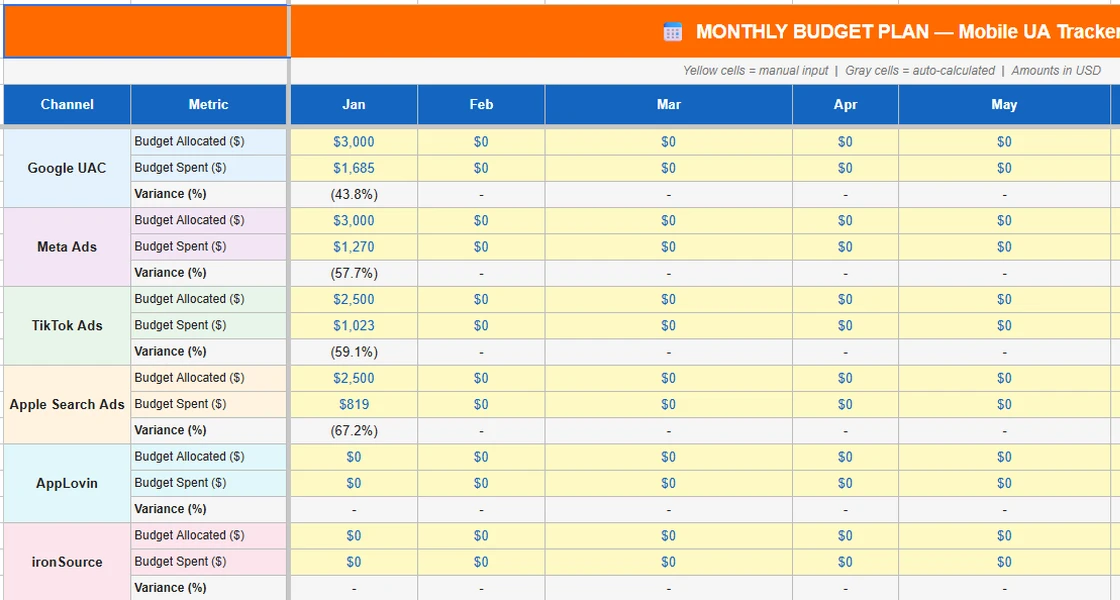
Plan before you spend. See variance the moment it appears.
Twelve months of allocated vs. spent, by channel. Every reallocation gets a line: how much, from where to where, why, and what happened two weeks later.
- Variance % per channel, per month
- Share of total spend by channel
- Budget Reallocation Log built in
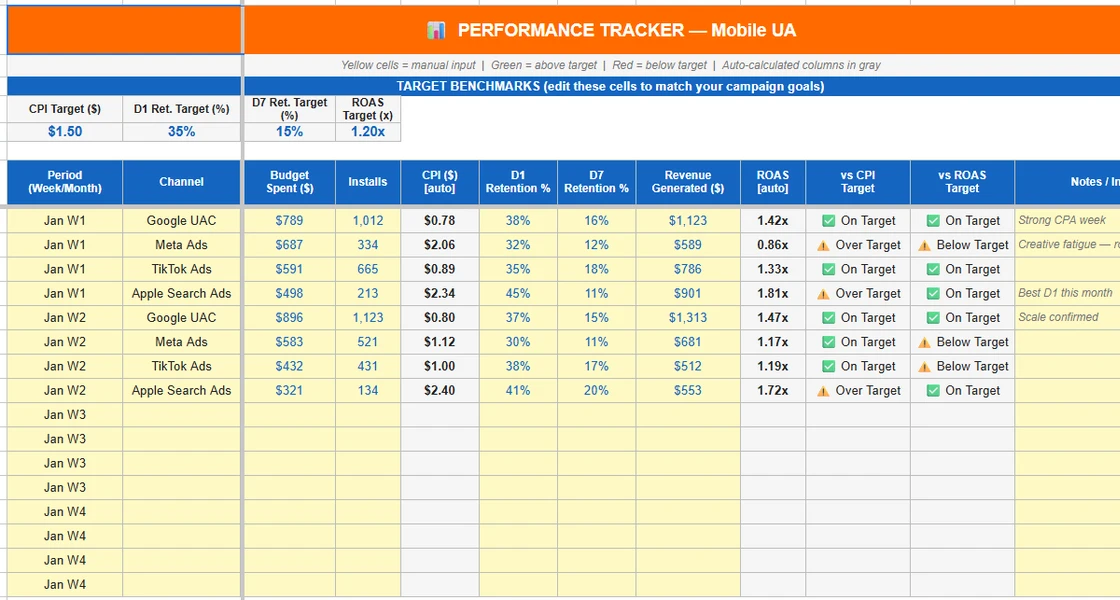
Log the week. CPI, ROAS and flags fill in themselves.
Enter spend, installs, D1/D7 retention and revenue per channel each week. CPI and ROAS calculate and get checked against your targets.
- Week-by-week rows with a notes column
- Period summary of channel averages
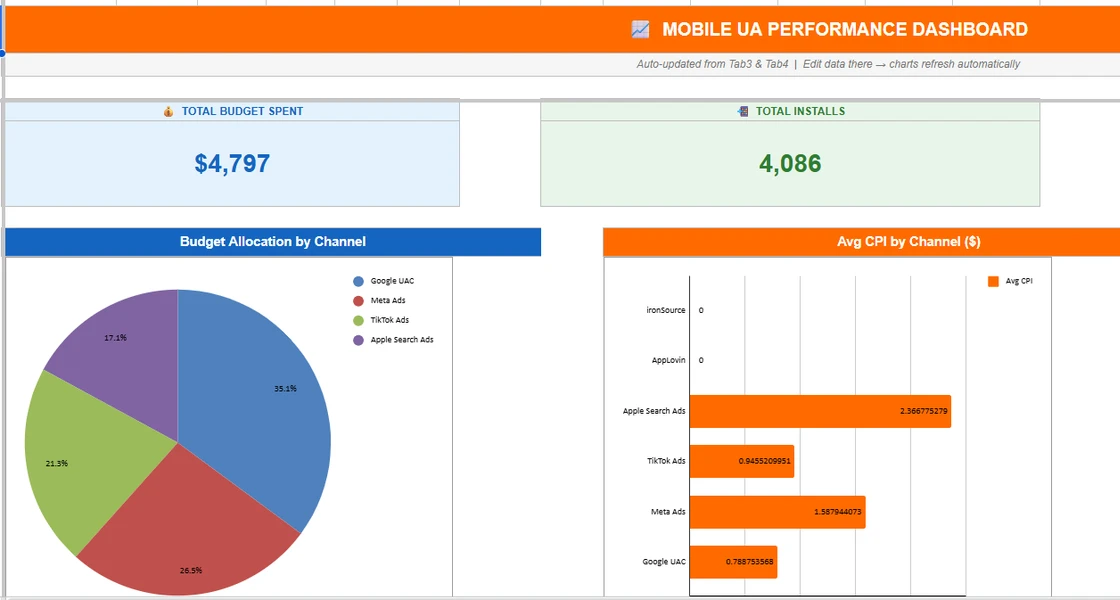
Five charts and a channel scorecard, ready for the weekly review.
Everything refreshes from the Budget Plan and Performance tabs. Screenshot it for a stakeholder update instead of building slides on Friday.
- Budget allocation · Monthly spend vs. plan
- Avg CPI · Installs · D1/D7 retention by channel
- Live channel scorecard — the free PDF is a one-time snapshot; this one updates every week
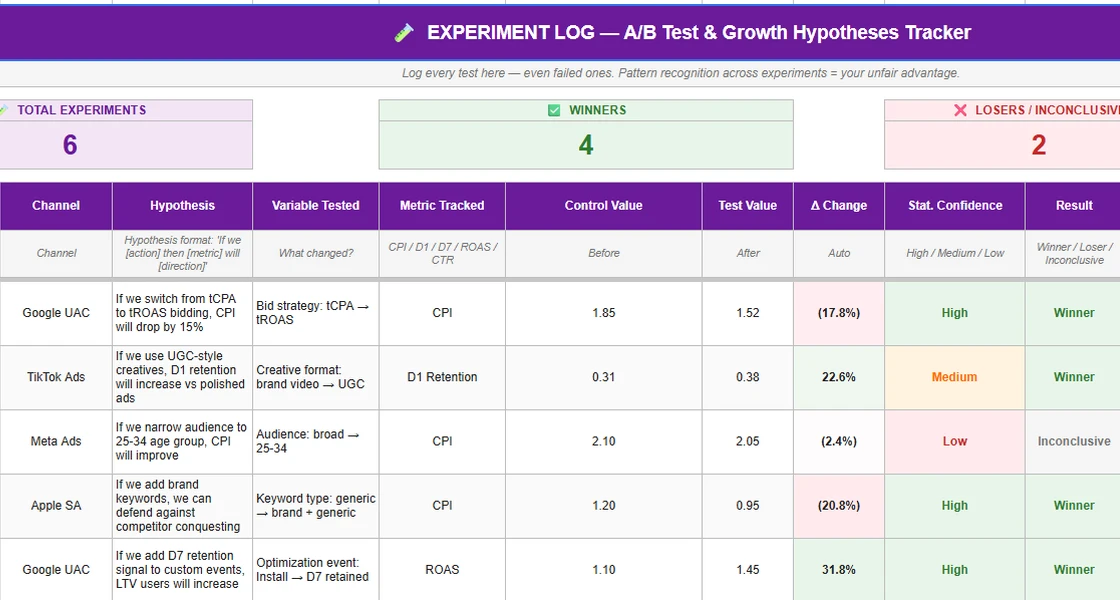
Every test gets a hypothesis, a result and a next step.
Log winners and losers alike. Win rate, average lift and budget impact are calculated per channel, so six months from now you know what worked.
- “If we [action], then [metric] will [direction]”
- Confidence by sample size: High = 500+ installs
- Summary by channel: tests, winners, win rate
AFTER CHECKOUT
In your Google Drive in under a minute
- 01Open the access link in your receipt email.
- 02Go to File → Make a copy to save it to your own Google Drive.
- 03Start with Tab 2 — Setup. Fill in channels and targets once; everything else auto-fills.
14-DAY MONEY-BACK GUARANTEE
Faster weekly review, or your money back
If the tracker doesn’t make your weekly UA review faster within 14 days, reply to your receipt email with one line on what didn’t fit — and I’ll refund you in full. No hoops.
Link not working? Reply to your receipt and I’ll fix it within 24 hours.
Who it’s for
Built for UA managers, not for looks
- Run paid UA on 3+ channels (Google, Meta, TikTok, ASA, DSPs)
- Report spend and results to a manager or founder every week
- Have an MMP but no single place for plan, actuals and decisions
- Need SDK-level attribution — that’s your MMP’s job
- Haven’t started paid UA yet — start with the free Scorecard
Build vs. buy
Why not build your own UA tracking spreadsheet?
You can. Most DIY trackers stop being updated within weeks — the reasons are in the complete guide to mobile UA tracking.
| DIY sheet | This tracker | BI tool | |
|---|---|---|---|
| Cost | Free + days of your time | $29 one-time, ~15 min setup | Licence + weeks of setup |
| Plan vs. actuals | Build it yourself | Built in | Custom work |
| Experiment & decision log | Usually missing | Built in | Not designed for it |
Global UA at a music-game publisher, mobile growth at Vietnam’s largest classifieds marketplace. 11+ channels run in production. Every quarter I rebuilt this sheet — this is the version I stopped rebuilding.
FAQ
Questions
Does this replace AppsFlyer or Adjust?
No. An MMP does SDK-level attribution, which a spreadsheet can’t. The tracker is the layer above it: budget plan, performance against targets, and the reason behind each change.
Does it work in Excel?
Yes. It’s built in Google Sheets and works in Excel.
Do I need to connect an API or ad account?
No. You paste or type your numbers into the yellow cells. Nothing to integrate, nothing that breaks when an API changes.
Which channels does it cover?
Google UAC, Meta, TikTok, Apple Search Ads, AppLovin and ironSource are set up, plus two custom channel slots. Turn each on or off in Setup.
What do I get after buying?
An access link to the Google Sheet in your receipt email. Go to File → Make a copy to save it to your own Drive, then start with Tab 2 — Setup. If the link doesn’t work, reply to your receipt and I’ll fix it within 24 hours.
Can I get a refund?
Yes — 14 days. If the tracker doesn’t make your weekly UA review faster, reply to your receipt email with one line on what didn’t fit and I’ll refund you in full. No hoops.
Run next Monday’s review from one file.
Six tabs · $29 one-time · 14-day money-back guarantee.
Not ready yet? Get the free UA Channel Scorecard first.